Etiketter

Showing posts with label Software. Show all posts

Tuesday, December 10, 2024

NotebookLM: Podcasting in Uncanny Valley

AI generated image 

Google's NotebookLM research tool has been around since 2023 but the 'deep dive' Audio Overview feature - making it a breeze to create an instant podcast-like conversation 
on any topic with two AI 'hosts' - really made waves in the media. On a first listen, the conversations can easily be mistaken for real podcast episodes with two human hosts but, after listening to them a bit more, it's obvious that something just isn't quite right. In fact, the way I see it, there's pretty much that's all wrong.

The AI hosts engage in an exaggerated rapid fire, light-hearted banter that in many ways sounds like a twisted parody of 'The Daily' podcast. No matter how serious the source material might be, the tone is always unaltered repeating the same worn out phrases over and over, the hosts jokingly confirming each other's views. 'Exactly! Exaaactly! Absolutely!' are some of the way too frequent NLM favorites, together with exclamations like 'whoa!' , 'tell me about it!' and 'heavy stuff' occasionally accompanied with a quick burst of truly uncanny-valley laughter. The hosts also sometimes refer to themselves as 'we humans' and they even talk about their very own(!) children in a way that is right out disturbing. Other kinds of hallucinations are there as well; for example, in one of the AI Overviews I created the hosts mentioned my son. Definitely interesting since I still firmly believe I don't have any children at all.

The NotebookLM voices are good, very good. It is obvious that soon - today?! - there's no way to distinguish an AI generated voice from a flesh and blood human one. However, as a podcaster, artificial intelligence just can not compete with us mortals. The explanation is simple: an advanced auto complete function, regardless of the digital steroids injected, can never have a unique personality that's the very hallmark of a human podcast host.

So, is it Cool? To start with, sure, but after a while - nope. Instead I get this slight feeling of nausea when listening to these fake podcasts. Luckily, there's a great and immediate remedy: turning the bots off! NotebookLM is definitely useful even if you skip the hyped all-American AI podcast hosts.   

Monday, February 15, 2021

Android utility: Gravity Screen

I don't know about you but I've got quite a few apps on my (old!) Android Pixel 2 phone - and, I admit, very few of them are used on anything like a daily basis. Probably I should delete a bunch of the apps on my phone (note to self: do it!). However, there is this one app I use constantly because it's running all the time: the behind-the-scenes utility called GravityScreen.

GravityScreen has been around for many years and it plugs a gaping hole in the software of most Android phones, by automagically turning the screen off when you put the phone in your pocket or when the device is set to rest on a horizontal surface. Actually, I hardly ever need to use the power button of the phone any more. The way I have configured GS, my Pixel 2 also locks almost immediately in both cases so I never need to worry about leaving it unlocked.

There are many additional cool features - and tons of customization options - offered by GravityScreen and one of the most useful ones is its ability to keep the screen turned on as long as you hold the phone in your hand, in upright position. The app detects the very small movements of your hand so the screen never turns off while you are checking something on your phone, no matter how long time you view it.

On the downside - your 'mileage' using GravityScreen may vary, depending on the phone you use and the Android version that's running on it. The latest Android iteration apparently makes it impossible to utilize some features of GravityScreen - for example, the delayed lock doesn't work for me - but the app still ranks very high on my Cool Gear list.

Like what you're reading? Cool - then get notified of new CGoN posts here!

Thursday, February 4, 2021

PersistentWindows: They Stay Put

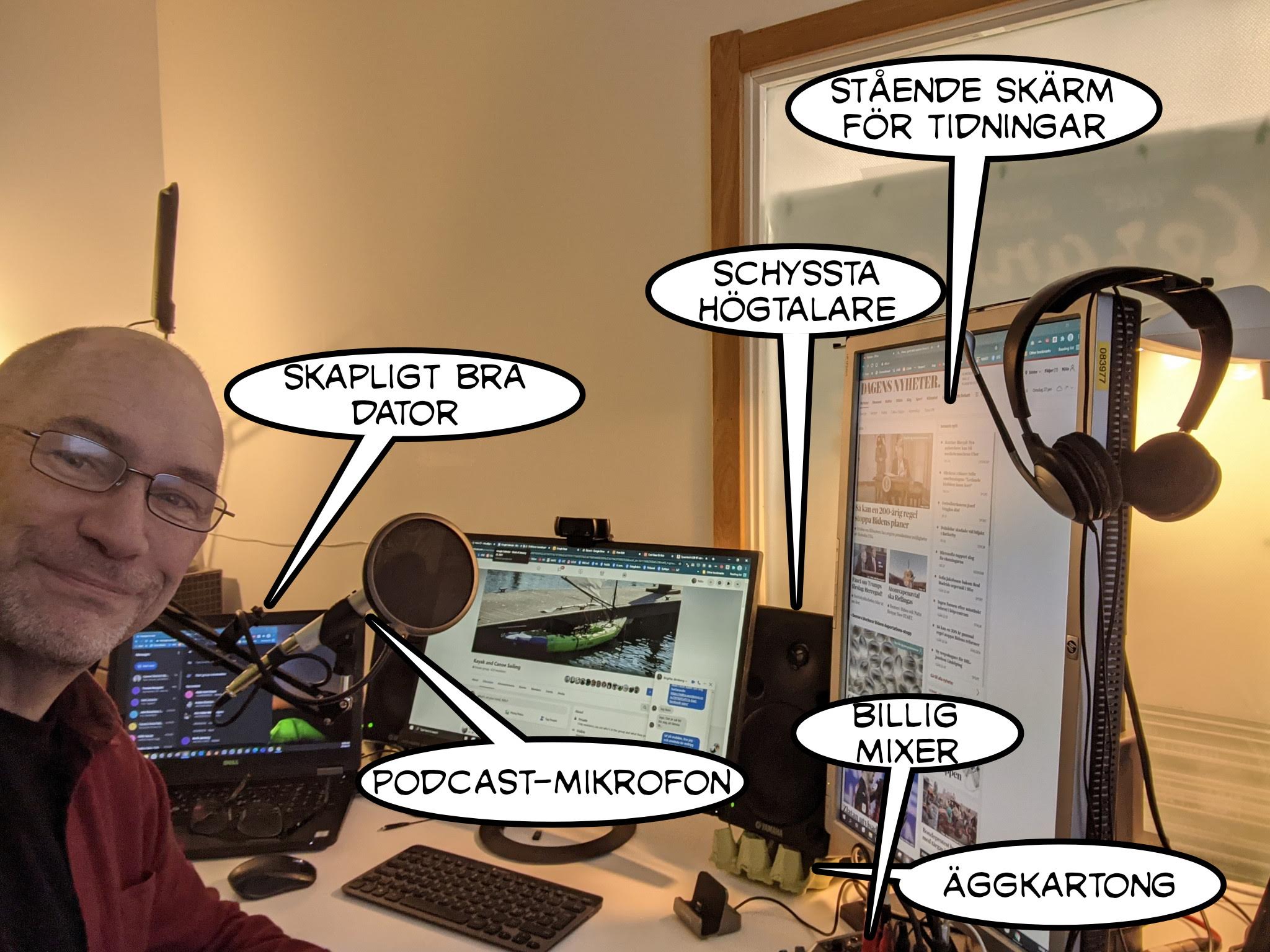
Take the chance and learn some Swedish from the speech bubbles! Anyway, now my windows are exactly where I left them - at long last 

Most people are computer users these days - in some shape or form - and it's also quite common to have multiple displays at your desk. My setup is based on a Windows 10 laptop (that's more or less permanently on the left side of my desk), one main screen in landscape mode in the middle and another one in 'portrait' position to the right, for web publications mostly.

The way I position the windows on my displays is always the same and it has been driving me nuts that the window positions often get totally messed up after the computer has been switched off or when waking up from 'sleep'! I've been telling myself many times that there must be an easy fix for this but I've never really taken the time to dig deep into the issue - until now. I figured that there must be a setting in Windows to do the job but, if there is one, I sure wasn't able to find it. There were several workarounds suggested in the web forums but the mileage varied way too much for me to try them out.

I got close to giving up my search but then I noticed that there is an application at GitHub that addresses the very problem i had: PersistentWindows. Yay! It looked good so I downloaded the executable, ran it, fixed the Task Scheduler to fire up the utility as suggested and - hey presto! Now those windows stay put just where I want to have them! I'm inclined to paraphrase the legendary Windows update message and say: now all my windows are just where I left them. Phew. A very Cool piece of software, available for free - thanks a ton to the contributors!

Like what you're reading? Cool - then get notified of new CGoN posts here!